

fast, quiet terminal multiplexer for linux.


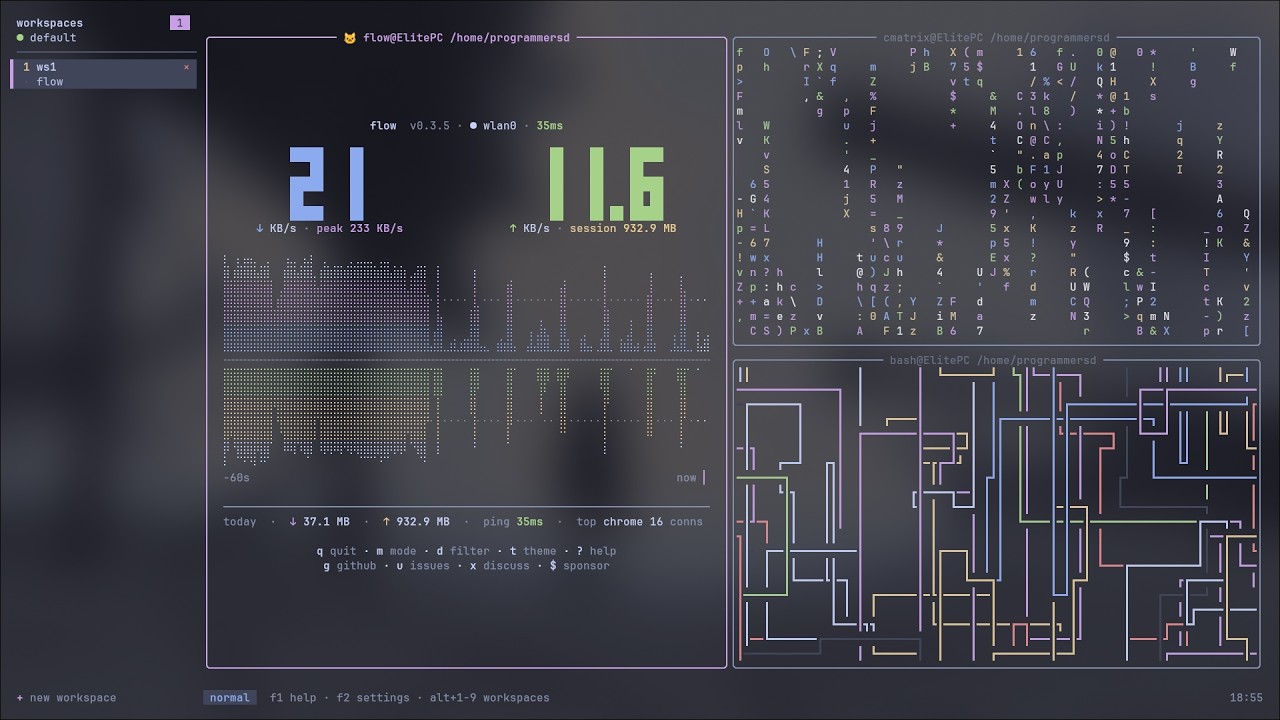
- sixel graphics: clipped and tracked with pane scrolling, powered by
icy_sixel - kitty graphics protocol: image transmission, placements, scrolling, and resize support
- multiple workspaces: organize panes across independent workspace sets
- tiled layouts: dwindle (default) or monocle, with configurable splits
- floating panes: drag-and-drop, drag-resize corners
- four keybinding profiles: beginner (mouse+f-keys), hypr (hjkl power set), vim (vi grammar), dev (editor/ide ergonomics)
- copy mode: vim-like scrollback search and selection
- live settings: edit 40+ options via f2, changes apply instantly
- bright ui: centered dialogs, colorful cli
- workspace tab context menu: right-click a tab for rename / new / close, anchored at the click
- scroll indicator: optional "↑12" marker in the pane title while scrolled back
- sidebar fold:
shift+tabfolds the workspace sidebar away in every profile - fast: event-driven, diff-based updates, minimal cpu
yay -S venti-binuse paru -S venti-bin if you use paru.
git clone https://github.com/programmersd21/venti
cd venti
cargo build --release
sudo cp target/release/venti /usr/local/bin/ventiauto-creates config at ~/.config/venti/config.toml.
f1= help + keybindingsf2= settings menu (live editor, including switching the four profiles)f11= command palettef12= theme picker
press f1 for complete reference or read docs/keybindings.md.
alt+1..9     switch to workspace 1-9
alt+n        new workspace
alt+w        close workspace
alt+arrows    focus left/down/up/right
f10           resize mode
f3            new pane (split right)
f4            close pane
hypr/vim profiles bind alt+hjkl to focus and alt+shift+hjkl to swap; dev profile binds arrows + alt+enter new pane. see docs/keybindings.md.
f1            help
f2            settings
f5            zoom toggle (monocle)
f6            floating toggle
f8            search scrollback
f9            copy mode
f11           command palette
f12           theme menu
in hypr and vim profiles:
alt+space      command palette     (hypr)
alt+p          rotate split        (hypr)
alt+t          theme menu
alt+s          toggle sidebar
all multiplexer bindings use alt (escape-prefixed, reliable everywhere terminals speak). apps receive untouched plain ctrl+key sequences.
full reference: docs/keybindings.md
custom bindings: edit [binds] in ~/.config/venti/config.toml
~/.config/venti/config.toml (auto-created):
[general]
shell = ""   # empty: $SHELL, falls back to /bin/sh
scrollback = 10000
graphics = true  # enables Kitty and Sixel graphics forwarding

[decorations]
border_style = "rounded"
pet = true
pet_emoji = "🐱"

[ui]
show_pwd = true
show_hostname = true
workspace_bar = "top"

[theme]
name = "mocha"  # 15 builtin dark themes

[binds]
# override any keybinding
"alt+3" = "workspace_goto 2"
"alt+shift+3" = "move_to_workspace 3"
"alt+shift+w" = "close_workspace"
live editing: press f2 in venti to adjust 40+ settings.
docs: docs/configuration.md
- linux only: vt100 terminal emulation via term-wm-vt100 (patched)
- graphics support: kitty graphics and sixel are selected from the attached terminal's
TERMandTERM_PROGRAMidentity - fast: event-driven, minimal allocations, diff-based rendering
- minimal deps: ratatui, crossterm, serde, nix syscalls
- no ui framework overhead: custom rendering for perfect pixel control
- bright & readable: catppuccin mocha + 14 other dark themes
- four profiles: beginner, hypr, vim, dev, composable commands, fast fingers
- alt-first keybindings: escape-prefixed combos work in most terminals (see docs)
venti                 # attach to default session
venti new -s myproject   # create and attach to a named session
venti ls            # list sessions
venti send -t default "ls -la"   # send keys to pane
venti run -t default workspace_goto 2  # run command
venti kill -t default # kill session
venti doctor          # system check
venti config check # validate configcargo build # debug build
cargo build --release # release binary
cargo test --no-fail-fast # run all tests
cargo test --test sixel_graphics_test # sixel rendering verification
cargo clippy # lintdocs/quickstart.md- hands-on tutorialdocs/keybindings.md- complete referencedocs/configuration.md- config file guidedocs/architecture.md- internal designdocs/protocol.md- wire protocol specificationdocs/zsh.md- zsh setup and completionsdocs/index.md- faq and troubleshooting
venti forwards kitty graphics protocol and sixel sequences, subject to the attached terminal's detected capabilities. iterm2 image sequences are unsupported. see graphics documentation for protocol scope and limitations.
issues, discussions and pull requests are welcome - see contributing.md for the workflow, the code style and how to run the test suite.
mit
inspired by tmux, zellij, helix.
built with ratatui, crossterm, serde, icy_sixel.
colors from catppuccin.
venti 0.2.0, 2026-11-19
a fast, quiet terminal multiplexer for linux.